Why Use This Template?
Designed to make your thesis writing experience smooth and professional.
UTAR Compliant
Formatted strictly according to UTAR's thesis and dissertation formatting guidelines.
Professional Design
Clean typography, proper margins, and widely accepted academic layout standards.
Developer Friendly
Modular file structure making it easy to manage large documents and chapters.
Quick Setup
Ready to compiled on Overleaf, VS Code, or your local LaTeX environment.
Simplify Your Citations
The author has created a free tool to convert DOIs and URLs directly to clean BibTeX entries.
- Instant DOI/URL to BibTeX conversion
- Automatic arXiv to Journal DOI discovery
- Free and no registration required
Getting Started
Choose your preferred way to work with the template.
Easiest Method: Copy from Overleaf
Overleaf is an online LaTeX editor that requires no installation. It's the fastest way to get started.
-
1
Go to the template on Overleaf:
Open Template in Overleaf -
2
Sign up or Log in to your Overleaf account.
-
3
Click the "Open as Template" or "Copy Project" button.
-
4
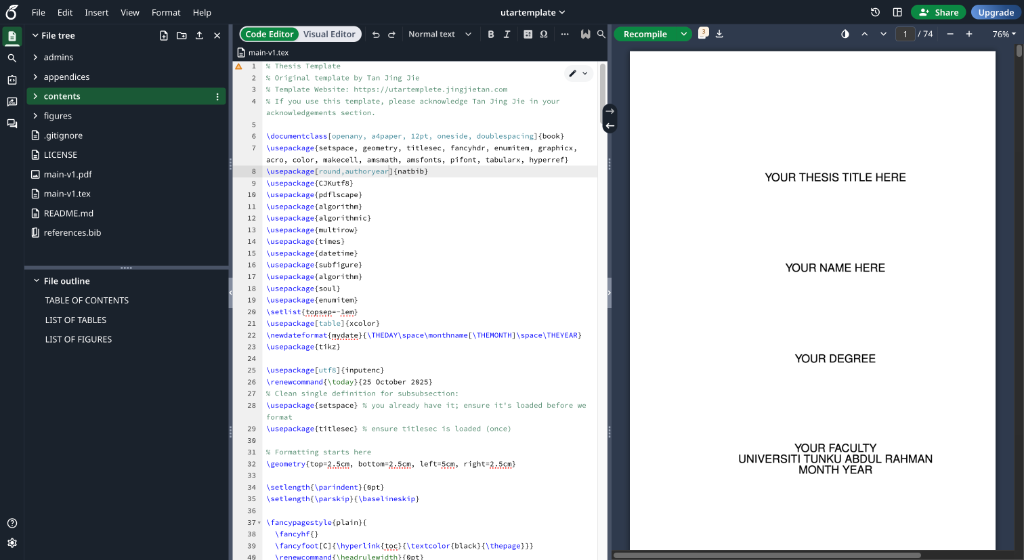
Set the main file to
main-v1.texand click Recompile.
Pro Tip: VS Code Integration
You can use the Overleaf Extension in VS Code to edit your cloud projects locally. Check the README for setup details.
Running Locally on macOS
Method 1: MacTeX (Recommended)
Download the full distribution (~4GB) from tug.org/mactex. This includes TeXShop and all necessary packages.
Method 2: BasicTeX (Lightweight)
brew install --cask basictex
sudo tlmgr update --self
sudo tlmgr install collection-latexextraRunning Locally on Windows
Method 1: MiKTeX (Recommended)
Download from miktex.org. During installation, choose "Install missing packages on-the-fly".
Method 2: TeX Live
Download the installer from tug.org/texlive.
Template Structure
The template is organized into a clean, modular structure.
main-v1.tex- The root file. Compile this!admins/- Front matter (Abstract, Cover Page, etc.)contents/- Your chapters go here.figures/- All your images and diagrams.references.bib- Citation database.
utartemplate/
├── main-v1.tex
├── references.bib
├── admins/
│   ├── coverpage.tex
│   ├── abstract.tex
│   └── ...
├── contents/
│   ├── c1intro.tex
│   ├── c2lit.tex
│   └── ...
└── figures/
    └── diagram.pdf
Troubleshooting & FAQ
Top of Contents or References not appearing?
LaTeX requires multiple passes to resolve cross-references. Compile the document twice (or 3-4 times for BibTeX) to ensure everything is generated.
Standard Sequence: pdflatex → bibtex → pdflatex → pdflatex.
How to change the citation style?
Open main-v1.tex and find \bibliographystyle{plainnat}. You can change it to ieeetr (for IEEE) or other supported styles. Remember to recompile!
Missing packages error?
If you are using MiKTeX, it should prompt you to install them automatically. For other distributions, use your package manager (e.g., tlmgr install package-name).
License / Attribution?
This template is free to use but requires attribution. Please keep the acknowledgement in your thesis (an example is provided in admins/acknowledgment.tex).
License & Acknowledgement
Free for all UTAR students. Just give credit where credit is due.
If you use this template for your thesis or dissertation, please acknowledge the original author in your acknowledgements section. This ensures the project remains sustainable and open source.
This thesis was prepared using a template originally developed by Tan Jing Jie. The template is available at: https://github.com/jingjie00/utartemplate
Understanding the License
This template is licensed under the UTAR Thesis Template License (Attribution Required).